A book rarely becomes untidy all at once. It happens gradually, usually while the writing itself appears to be going well. One chapter is in a Word document. Another is copied into a second file so that a risky revision can be attempted. Research sits in a browser folder, character notes live in a notebook, and a useful paragraph has been emailed to myself because I thought that would make it impossible to lose.
None of these choices seems unreasonable at the time. Every one of them solves an immediate problem. Together, however, they create a larger one. The manuscript stops being a book and becomes a collection of places where parts of a book might be found.

When the book became a filing problem
My first warning was not a dramatic loss of work. It was hesitation. I would sit down intending to write and spend the opening part of the session checking which document contained the most recent version. A file marked “final” might be followed by “final revised”, “final new”, and the especially optimistic “final use this one”. Dates helped until I copied an older file onto a newer computer and changed its modified date.
The manuscript itself was only part of the problem. I had notes about people, places, unresolved questions and scenes that needed to be moved. Some were attached as comments inside documents. Others were in separate files whose names made sense when I created them and became mysterious several weeks later. A notebook contained good material, but only if I remembered that it existed and happened to have it beside me.
This changed the nature of a writing session. Instead of returning to the story, I returned to its administration. Before I could decide what happened next, I had to reconstruct what I had already decided. The work developed a small entrance fee, payable in attention, every time I opened it.
The problem was not that Word had failed. It continued to do what it was designed to do: create and edit documents. The problem was that a book is not simply one long document. It is a structure made from chapters, scenes, research, plans, discarded possibilities and hundreds of decisions that need to remain available without crowding the page.
Why ordinary documents stopped working
For a short piece, a single document is often exactly right. A book asks more of the writer. Moving from chapter four to chapter seventeen should not require a long scroll or a search for a distinctive sentence. Rearranging the argument in a non-fiction book should not mean cutting several pages and hoping the clipboard remains intact. A note about a character should be close enough to consult without appearing inside the finished manuscript.
I tried using folders more carefully. Each chapter received its own document, while research was divided into subjects and versions were dated. The system was tidy in the way a filing cabinet is tidy. Unfortunately, writing the book meant continually opening the drawers. The organisation existed outside the manuscript rather than supporting it.
I also experimented with general note-taking tools. They were useful for collecting information but did not think in books. A novel, a stage play and a piece of long-form non-fiction have different shapes. I did not want to build a writing system before I could begin writing. I wanted the structure to be available from the start and flexible enough to change when the book changed its mind.
That distinction became important. The best writing tool would not merely store more material. It would reduce the number of decisions needed to reach the material that mattered now.
What I wanted from a writing tool
My requirements were less glamorous than most software feature lists. I wanted to see the whole book without displaying the whole manuscript. I wanted chapters and scenes to have clear places, and I wanted to move between them without hunting through files. I wanted notes to remain beside the work they described. Above all, I wanted to open the project and know where I was.
I also wanted the tool to stay out of the prose. Writers can lose a surprising amount of time adjusting a system that was meant to save time. Colours, tags and elaborate workflows can become respectable forms of avoidance. Organisation is useful only when it makes the next writing decision easier.
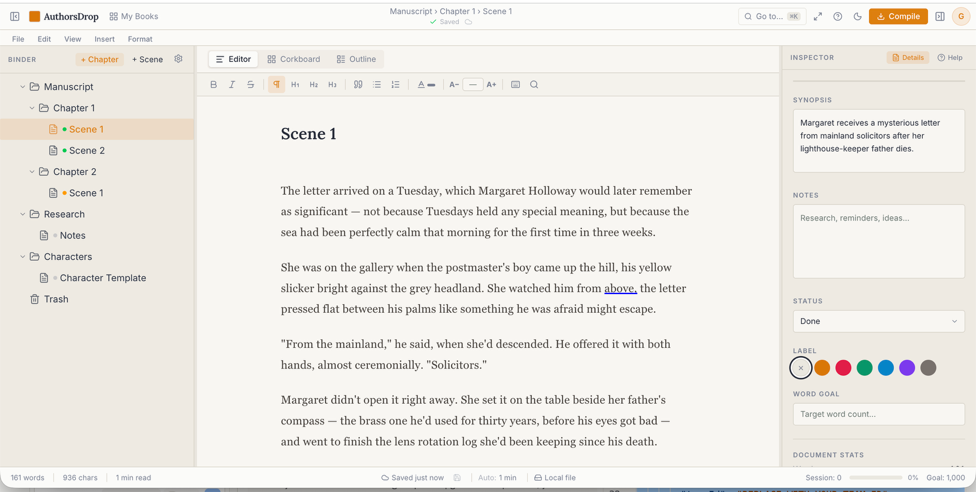
This was what made AuthorsDrop interesting to me. It presented the manuscript as a book rather than as a very long page. The binder gave the structure a visible home. The corkboard offered a broader view of sections and scenes. The inspector kept supporting information near the writing without forcing it into the text. Those elements were not decorations. They addressed the exact points where my improvised collection of files had begun to slow me down.
How AuthorsDrop changed the process
The most immediate change was simple: I stopped asking where things were. Opening the project showed me the shape of the manuscript and the place where I had left it. Chapters could be treated as parts of a single work rather than unrelated documents sharing a folder. Moving through the book felt less like searching and more like navigating.
The binder proved useful because it made structure visible without making it rigid. I could see the order of chapters, recognise an overcrowded section and move material when the balance was wrong. A structural problem that had been hidden inside thousands of words became easier to notice when the parts were displayed together.
The corkboard gave me another level of distance. When I was too close to individual sentences, I could step back and consider what each section was doing. A scene might be well written yet serve no clear purpose. A chapter might contain three ideas when it needed one. Seeing summaries together exposed repetition and gaps long before a complete read-through would have found them.
The inspector helped with the quieter burden of remembering. Notes, reminders and relevant details could remain connected to the section they concerned. I no longer had to interrupt a paragraph to search several documents for a decision made two months earlier. The information had not become more intelligent. It had simply been placed where it could be useful.
None of this wrote the book for me, and that is precisely the point. A writing tool should not pretend that organisation is creativity. It should protect the conditions in which creativity can continue. AuthorsDrop reduced the distance between opening the project and working on the manuscript.
Momentum matters more than features
Writers often describe momentum as though it were a mysterious gift. Sometimes it is. More often, momentum is the result of making it easy to resume. If yesterday’s work is understandable, today’s work has somewhere to begin. If the next scene has a clear place in the structure, starting it requires less negotiation.
Scattered files damage momentum because they turn every return into a small recovery exercise. The writer must remember the current version, locate the relevant notes and rebuild the mental model of the book. Even when this takes only ten minutes, those minutes occur at the most vulnerable point of the session, before the work has regained its grip.
An organised workspace does not remove uncertainty from writing. Books remain difficult, chapters resist improvement, and characters continue to make decisions that were not in the plan. What changes is the kind of uncertainty being faced. I can spend my attention deciding what the book needs rather than deciding where I saved it.
This is also why simplicity matters. A tool can contain hundreds of abilities and still fail if the writer must manage the tool more carefully than the manuscript. The useful features are the ones that become part of the working rhythm: open the project, see the structure, choose the section, consult the relevant notes and write.
A calmer way to finish a book
I used to think manuscript disorder was an unavoidable stage of writing a book. Perhaps every project eventually produced its own untidy archive, and finishing meant developing enough patience to survive it. I no longer think that is necessary.
A book will always accumulate complexity because thought accumulates complexity. The answer is not to force every idea into one document or to construct an elaborate filing system around the manuscript. It is to use a workspace that understands the book as a collection of connected parts and keeps those parts close to the act of writing.
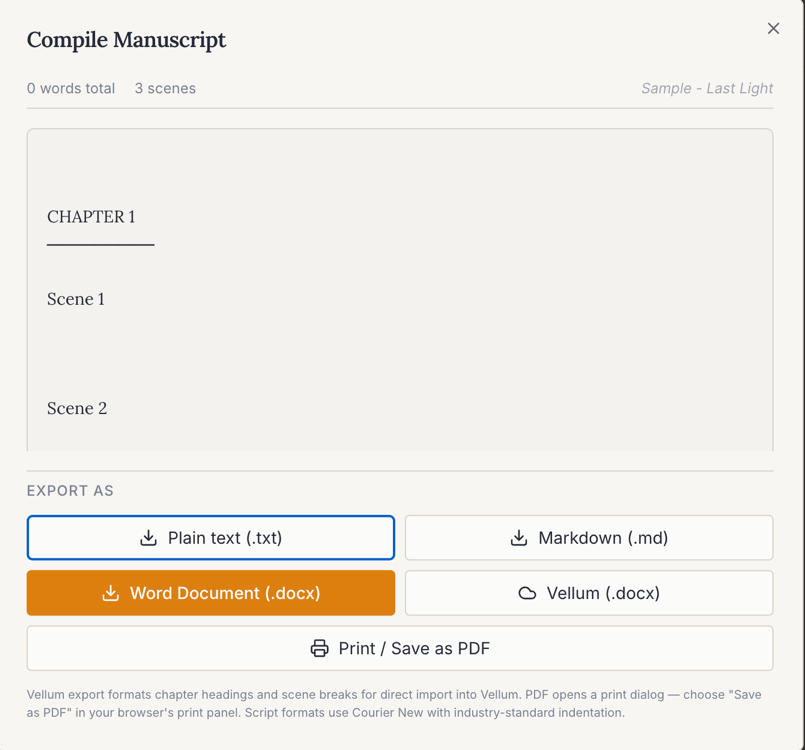
AuthorsDrop did not make the work smaller. It made the work clearer. The manuscript, its structure and its supporting notes stopped competing for attention and began to feel like one project again. That clarity made it easier to return, easier to revise and, most importantly, easier to continue.